Documents that can be found, and expiries that get noticed
Contracts, licences and compliance documents in one searchable store, with expiry tracking and controlled access.
- Type
- Portals & Applications
- Industry
- Professional Services
- First phase
- 4 to 6 weeks
The situation
A fictional multi-site services company holds several thousand documents: client contracts, statutory licences, insurance policies, employee records and equipment certifications. They are spread across a shared drive, email attachments and physical files at each site. Renewal dates are tracked in a spreadsheet one person maintains.
The immediate risk is a lapsed licence or insurance policy nobody noticed. The daily cost is the time spent looking for documents that exist somewhere but cannot be located quickly.
Fictional scenario, synthetic data. The company does not exist and no figures here describe a real deployment. The approach and features are real; the interfaces are illustrations.
Why this is difficult
- Documents are spread across shared drives, inboxes and physical files at multiple sites
- Renewal and expiry dates depend on one spreadsheet and one person
- Finding a specific contract clause means opening many files
- There is no record of who accessed or shared a sensitive document
- Multiple versions of the same document exist with no clear current one
- Audit preparation involves days of collecting evidence
- Departing employees leave documents in personal folders
How we would build it
The design goal is that a document is worth storing only if it can be found again and only if its expiry is tracked. Everything else follows from those two requirements.
- 01
Structured document records
Each document is a record with a type, owner, related entity, effective and expiry dates and searchable metadata, not just a file in a folder.
- 02
Full-text search
Content is indexed including scanned documents through OCR, so a search finds the clause rather than only the filename.
- 03
Expiry and renewal tracking
Every dated document generates reminders at configurable intervals, assigned to a responsible person rather than to an inbox.
- 04
Version control
New versions supersede rather than replace, so the current version is unambiguous and the history remains available.
- 05
Access control and audit
Permissions by document type, department and site, with every view, download and share recorded.
- 06
Compliance dashboard
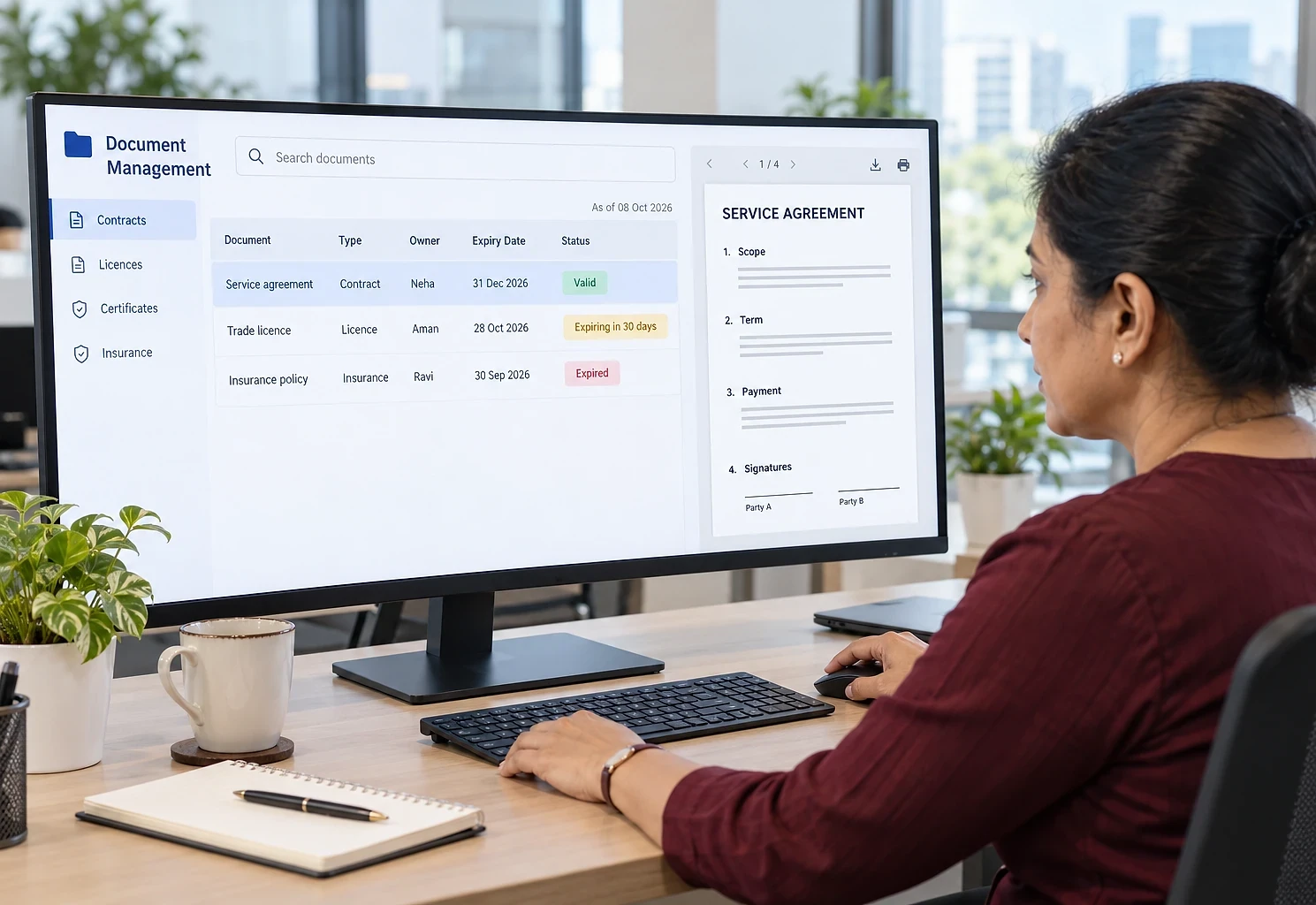
A single view of what is valid, what is expiring soon and what has lapsed, per site and per category.
- 07
Bulk migration
Existing documents imported from shared drives with automated classification and metadata extraction, then reviewed.
Recognise this problem?
Tell us how it works in your business. You get a written plan and a fixed price for the first phase.
What it looks like
Drawn rather than screenshotted, so nothing here can be mistaken for a real client system. Every figure on the screen is sample data, not a result.
What it would be built with
The final choice depends on what the business already runs.
- Application
- Next.jsTypeScriptReactServer actions
- Storage & search
- S3-compatible object storagePostgreSQL full-text searchOCR pipelineSigned URLs
- Security
- Role-based access controlAccess audit loggingEncryption at restRetention policies
- Automation
- Scheduled reminder jobsAutomated classificationEmail and WhatsApp notifications
How a single item moves through the system
- 1
Document added
Uploaded individually or in bulk, with metadata suggested automatically from the content and confirmed by the user.
- 2
Indexed
Content is extracted and indexed, including OCR for scans, making it searchable immediately.
- 3
Owner and dates set
A responsible owner and any effective and expiry dates are recorded, which drives all later reminders.
- 4
Reminders issued
As expiry approaches, reminders go to the owner and escalate if no action is recorded.
- 5
Renewed and superseded
The renewed document is uploaded as a new version, the previous one is retained and the compliance view updates.
- 6
Retrieved and evidenced
Search finds documents by content or metadata, and an audit evidence pack can be exported for a period or category.
What this kind of system tends to change
Described qualitatively and deliberately so. We have not deployed this scenario, so quoting a percentage improvement would be inventing evidence.
- 1
Lapsed documents become unlikely
Owned, escalating reminders address the most expensive failure mode: discovering a licence or policy expired weeks ago.
- 2
Retrieval in seconds
Content search across a properly indexed store replaces the search through folders and inboxes.
- 3
Audit preparation becomes routine
Evidence packs are exported rather than assembled, which turns a multi-day exercise into a task.
- 4
Knowledge stays with the business
Documents in a shared, permissioned store do not leave with the person who filed them.
- 5
Access you can account for
A record of who viewed or shared a sensitive document matters when a question is later asked.
Services and solutions behind this
Custom Web Applications
Internal tools and business systems built around your actual process instead of forcing you into someone else's.
Business Portal Development
Secure login areas where customers, vendors or staff handle their own requests, orders and documents.
Email & Document Automation
Read incoming emails and documents automatically, extract what matters and file it where it belongs.
Vendor Portal
Structured vendor onboarding, document tracking, purchase order acknowledgement and invoice submission.


Is this close to your situation?
If this scenario resembles what happens in your business, we can have a much more specific conversation. Tell us how it works today and we will tell you what we would change first.
The first conversation is free, with no obligation.