There is a particular kind of work that exists in almost every business and that almost nobody plans for. Someone opens an email. They read a PDF attached to it. They work out which customer it came from and what they are asking for. Then they type that information into another system.
Nobody was hired to do this. It accumulated. And because each individual instance takes only two or three minutes, it rarely gets identified as a problem — it just quietly consumes a person's morning, every morning.
This is the single most automatable category of work in a typical SME, and until fairly recently it was also one of the hardest to automate. That has changed, and it is worth understanding why, because it determines which of your processes are now worth revisiting.
Why this used to be hard
The traditional approach to reading documents automatically was template matching. You told the software: on this customer's purchase order, the order number is in the top right, the item table starts below the line that says "Description," and the total is the last row.
This works beautifully for exactly one document layout. It breaks when the customer changes their ERP, adds a logo, or sends a scan that is slightly rotated. If you have eighty customers, you need eighty templates and someone to maintain them.
For most businesses the maintenance burden exceeded the benefit, so the work stayed manual. That was the correct decision at the time.
What changed
Language models can read a document the way a person does — by understanding it rather than by matching positions. You describe what you want extracted, in plain language: the customer's order reference, the delivery date, and each line item with its code, description, quantity and rate. The model finds those things regardless of where they sit on the page or how the document is laid out.
This means a new customer sending a format nobody has seen before generally works on the first attempt. That is the practical difference, and it is what makes automation viable at SME scale for the first time.
We want to be careful not to overstate it. Poor-quality scans, handwriting and genuinely ambiguous documents remain hard. Accuracy is high but never perfect. Which brings us to the part that decides whether one of these projects succeeds.
Confidence, not perfection
The mistake people make when thinking about document automation is imagining a binary: either it works and you replace the data-entry role, or it does not work and you abandon it. Neither happens.
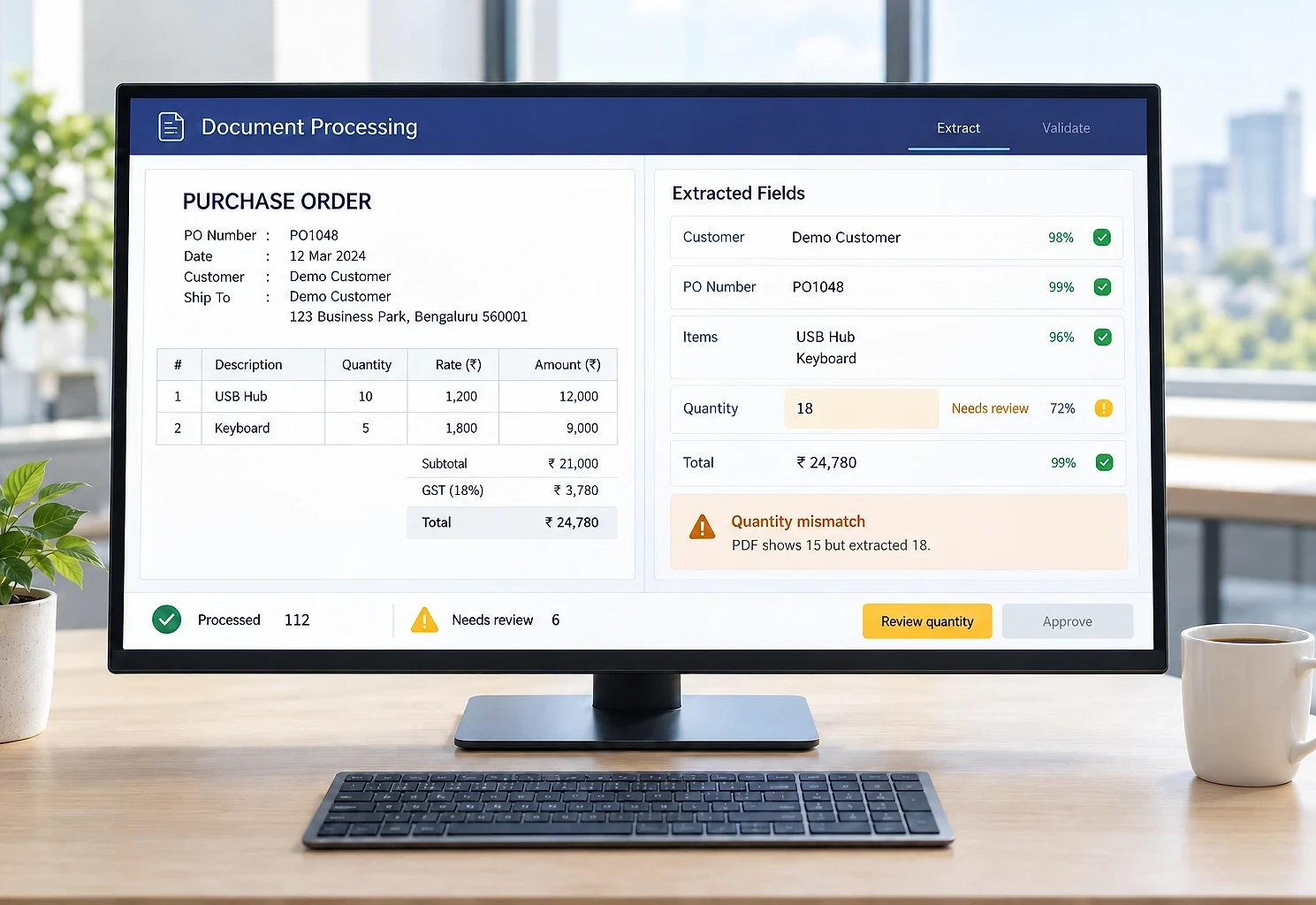
What works is designing the system around confidence. Every extracted field gets a confidence rating. Language models do not hand out a reliable number on their own, so the rating comes from checks around them: validation rules (is this a real GSTIN, does the total add up), cross-checks against your own records (does this customer and product exist, is the price plausible) and, where the model provides them, its own probabilities. Then you set a rule:
- High confidence and passes validation → the record is created automatically.
- Anything else → it goes to a review queue, where a person sees the original document beside the extracted values and confirms or corrects it in a few seconds.
That review step is not a failure of the automation. It is the design. It means the automation is never guessing into your system, and it means you can start with conservative thresholds and loosen them as you build trust.
In practice, the proportion that flows straight through varies a lot by document type and quality. Clean digital PDFs from regular customers do well. Photographs of crumpled delivery notes do not. Rather than promise a number, the honest approach is to measure it on your actual documents before you commit to building anything — which is what a proper assessment phase is for.
Validation matters more than extraction
Here is the part that gets underestimated. Extracting a value correctly from a document is only half the job. The other half is checking whether it makes sense.
A good automation validates extracted data against your own records before creating anything:
- Does this customer exist, and are they active?
- Does this item code exist? If the customer uses their own codes, does it map to one of ours?
- Is the quantity within a plausible range for this item?
- Does the rate match the agreed price for this customer, and if not, by how much?
- Is the delivery date achievable?
Validation is where most of the value sits, because it catches errors that a human data entry operator would also have made — and often catches them better, because a person typing their four hundredth order of the week is not cross-checking rates against a contract.
This is also where automation projects go wrong when they are done badly. A system that extracts flawlessly and writes unvalidated data into your order system has replaced a slow, careful process with a fast, careless one.
What is worth automating
Not everything. The tasks that repay the effort share three characteristics:
High frequency. A task done fifty times a day is worth automating. The same task done twice a week almost certainly is not, no matter how annoying it is. Build cost is roughly independent of volume; benefit is entirely dependent on it.
Rule-based. If you can explain to a new employee how to do the task in a few sentences, it can probably be automated. If the explanation is "it depends, you develop a feel for it," be cautious.
Currently a transcription step. The strongest candidates are where a person is acting as an interface between two systems — reading from one, typing into another — and adding no judgement in between.
Common examples that meet all three: purchase orders arriving by email, supplier invoices for accounts payable, delivery notes and proof of delivery, enquiry forms from multiple channels, bank statement reconciliation, and dispatch instructions from customers.
The parts people forget
Three things reliably get underestimated when planning one of these projects.
Exceptions are most of the work. The happy path — clean PDF, known customer, valid items — takes a fraction of the build time. What takes the time is deciding what happens when the attachment is corrupt, the customer is not in the system, the item code has never been seen, the quantity is implausible, or the same order arrives twice. Every one of those needs a defined behaviour, and "it will error" is not a behaviour.
You need a baseline. If you do not measure how long the task takes and how often errors occur before automating, you will have no way to demonstrate the value afterwards. This sounds like bureaucracy. It is the difference between a project that gets extended and one that gets questioned.
Adoption is a people question. Automation that appears without warning, framed as efficiency, gets quietly undermined. The framing that works is honest and specific: this removes the part of your job that is transcription, so you spend the time on exceptions and on customers. That happens to also be true.
A realistic sequence
If you are considering this, the sequence we would suggest:
- Pick one document type. The highest-volume one. Not a category — one specific document from one specific process.
- Collect a real sample. Fifty to a hundred actual documents, including the difficult ones. Not the tidy examples someone selects to be helpful.
- Measure feasibility before building. Test extraction against that sample and get a real accuracy figure. This is a few days of work and it prevents committing to something that will not perform.
- Build with review from day one. Never build the straight-through path first and add review later. The review queue is what makes it safe to go live.
- Shadow run before switching. Let the automation process real documents without creating records, and compare its output against what your team produces. This is where you tune thresholds with evidence rather than instinct.
- Expand by sender. Start with your highest-volume, most consistent customers. Widen once the results are trusted.
What to expect
The realistic outcome is not that a role disappears. It is that a person who spent most of their day transcribing spends a smaller part of their day reviewing exceptions, and the rest on work that needs a human — chasing genuine discrepancies, handling customers, catching the thing the system flagged as odd.
Orders get into the system as they arrive rather than when someone reaches that part of the inbox, which shortens the whole fulfilment cycle. A category of transcription error disappears. And volume can rise substantially without adding data entry headcount, because only exceptions need attention.
Those are worthwhile outcomes. They are also achievable, provided the project is scoped around confidence and validation rather than around the promise of a fully hands-off system. Anyone offering you the latter has not built one.